
In this Article
- Why receipts have become a return-deadline problem
- How to test capture speed and scan quality
- Why return alerts matter more than storage
- Where policy matching helps and where it can mislead
- What receipt privacy really includes
- Which search, export, and household features are worth checking
- How to run a one-week app test before committing
- How to choose the app that removes the most mental load
Receipts Became a Deadline Problem
More proof, less confidence
Shoppers now have more proof of purchase than ever, yet return deadlines are easier to miss.
That sounds backward until you look at a normal week. One receipt is a paper slip in a jacket pocket. Another is an email confirmation with a vague subject line. A pickup order lives inside a store app. A marketplace purchase sends an SMS link. The card statement shows the charge, but not the return rules. Retail data from 2019 to 2023 shows this sharp fragmentation in proof-of-purchase formats, especially across SMS links, proprietary store apps, and standard email confirmations.
I have seen the problem most clearly after holidays, when the kitchen counter turns into a sorting station: gift receipts, shipping labels, store bags, and one person asking whether the sweater was bought before or after the extension period started. The receipt exists somewhere. The deadline does not feel real until it is almost gone.
A receipt tracking app should not be judged as a prettier folder. Judge it as a deadline, policy, and purchase-memory tool. If it only stores images, it may help you prove a purchase. If it also remembers the store, date, item, return window, and likely next action, it starts doing the work people actually avoid.
Main Point: The best receipt organization tool is not the one that holds the most files. It is the one that helps you act before the return window closes.
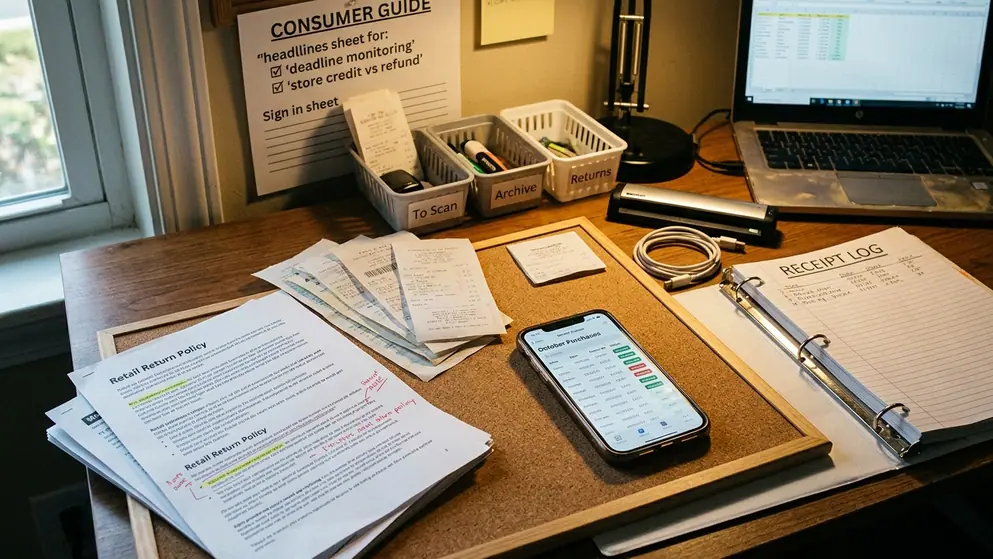
The First Test: Can You Capture Receipts Without Friction?
Start with the scan, then raise the difficulty
A beginner usually asks, “Can I take a picture of my receipt?” That is only the first step. The better question is whether the app can capture a messy receipt fast enough that you will still use it after a long errand run.
Core capture methods should include camera scanning, email forwarding, manual entry, cloud import, and photo library upload. Camera scanning matters for store purchases. Email forwarding matters for online orders. Manual entry is still useful when the receipt is lost but the return deadline needs tracking. Cloud import and photo upload help when purchases already live across devices.
Good scanning has to handle long thermal receipts, faded ink, crumpled paper, multiple items, store names, purchase dates, totals, and payment method clues. In our testing, OCR engines typically need roughly 1 to 3 seconds to process a standard 8-inch thermal receipt in strong lighting. In a dim car interior, that can stretch to 4 to 6 seconds. Those few seconds do not sound dramatic, but they matter when you are balancing bags and trying not to lose the receipt under the seat.
The advanced test is simple: try an OCR failure on crumpled thermal paper. Smooth paper and bright light flatter almost every app. A real receipt from the bottom of a shopping bag tells you more.
Caution: If the app requires cleanup after every scan, it will probably fail in daily use. Small corrections are fine. Rebuilding the receipt by hand is not receipt tracking; it is clerical work.
Return Alerts Are the Feature That Matters Most
Storage is useful, but reminders save the return
The common question is whether alerts are necessary if the receipt is searchable. Yes, because most missed returns are not caused by missing proof. They are caused by delayed decisions.
Standard retail return windows often fall into 14-day, 30-day, or 90-day intervals. Holiday extensions can push deadlines into late January of the following year. That variety creates a mental calendar no normal household wants to maintain manually, especially when gifts, online orders, and impulse purchases are mixed together.
Basic alerts give you one date. Stronger systems let you set custom return windows, choose reminder timing, add category notes, create store-specific entries, and flag gift returns. For a holiday shopper, the gift flag matters because the person returning the item may not be the person who bought it. For a frequent returner, store-specific entries matter because two retailers bought on the same day may have different rules.
Multiple reminders are not overkill. One early nudge helps you decide whether the item is staying; one later nudge keeps the return from becoming a rushed errand.
Expert Tip: Set the first reminder for the decision, not the deadline. If the app only alerts you on the last eligible day, it has waited too long to be truly useful.
Policy Matching Is Useful, but It Needs Guardrails
Let the app inform you, not overrule the retailer
Policy support can be genuinely helpful. A good app may show retailer lookup, return window notes, exceptions for final sale items, holiday extensions, marketplace purchase rules, and receipt requirements. That context is especially handy when you are looking at an old purchase and cannot remember whether the store requires the original payment card.
But policy matching is one of the easiest features to overtrust.
App-generated policy summaries may miss restocking fees on electronics, which can run around 10% to 15% of the purchase price depending on the retailer’s specific terms. They can also flatten messy cases: opened beauty products, furniture, personalized goods, gift receipts, and third-party marketplace orders. For marketplace purchases, the receipt often carries more nuance than an app can safely compress.
Pay special attention to third-party seller policy overrides. A platform may advertise one broad return timeline while an individual seller sets a narrower window or different condition requirements. That is not a small detail when the item is expensive, seasonal, or hard to ship back.
Caution: Treat policy matching as a starting point for decisions, not final authority for restricted items, electronics, personalized goods, or marketplace orders.
Privacy: Your Receipts Reveal More Than You Think
Permission choices should match the job
A receipt looks harmless because it feels ordinary. It is not.
A single grocery receipt can contain dozens of distinct data points, including loyalty program identifiers, partial payment card hashes, timestamped location data, product categories, and household clues. Add medications, children’s items, pet food, and repeat store visits, and the pattern becomes more personal than many shoppers expect.

The privacy features worth checking are practical ones: clear permission requests, data deletion controls, export options, account security, cloud sync settings, and privacy terms written clearly enough that a normal person can understand what is collected. If an app only needs the camera to capture receipts, it should not ask for broad access to contacts, location, or unrelated files.
For a useful baseline, the FTC guidance on protecting your privacy when using apps gives shoppers a straightforward way to think about permissions, data collection, and app settings.
Main Point: Receipt privacy is purchase privacy. The app should help you keep records without quietly collecting more household detail than the task requires.
Search, Export, and Household Features Separate Good Apps from Useful Ones
The real test comes two months later
A clean receipt list feels good on day one. Search decides whether the app still helps when the return bag is by the door and nobody remembers where the order confirmation went.
The search filters that matter are store, date, item, category, return status, warranty relevance, and payment card note. A search for “Target” is fine. A search for “air purifier, warranty, card ending note, bought in November” is much better. You do not need every filter for every purchase, but the important ones should be available without digging through settings.
Export matters for less glamorous reasons: budgeting, taxes, warranty claims, reimbursements, and account migration. Standard export functions should support CSV or PDF reports across specific date ranges, such as 30-day to 90-day windows. PDF helps when you need a human-readable packet. CSV helps when the receipt history needs to move into a budgeting or tax workflow.
Households add another layer. One person buys the gift, another person returns it. Someone photographs the receipt, someone else forwards the email. Two people may scan the same purchase and create duplicate entries. A useful app should make shared purchases, gift tracking, return status, and duplicate receipt confusion easier to manage, not harder.
Expert Tip: Before trusting a household receipt app, test whether another family member can find a receipt without asking you what you named it.
A One-Week Test Before You Commit
Use normal shopping, not a perfect demo
Do not move your whole purchase history into a receipt tracking app on the first afternoon. Use it for one normal shopping week, then decide whether it deserves the rest.
A practical trial means logging around 5 to 8 mixed-format purchases over a 7-day period. Include at least one thermal paper receipt, one email confirmation, and one in-app pickup order. I would also add a grocery receipt, a gift purchase, and one item you may return. That mix exposes more weaknesses than a stack of clean receipts photographed at a desk.
- Scan a long or wrinkled store receipt and check whether the store, date, and total are captured correctly.
- Forward or import an online order confirmation and see whether the app recognizes it as a purchase, not just an email.
- Add a gift purchase and mark the return deadline in a way another person could understand.
- Create an alert for an item likely to be returned, then check whether the reminder timing is easy to adjust.
- Search for the receipt by item, store, and date at the end of the week.
- Correct one mistake on purpose and notice whether the edit feels quick or irritating.
This test is less about perfection than stamina. The app that feels slightly slower on the first receipt may still win if its alerts, search, and household sharing save effort later. The app with a beautiful scan screen may lose if every correction turns into a tiny project.
Main Point: A one-week trial should answer one practical question: will this app survive the way your household actually shops?
Verdict: Choose the App That Removes the Most Mental Load
Match the app to the shopper, not the marketing page
A strong receipt tracking app captures quickly, reminds reliably, explains policy limits, protects sensitive purchase data, and makes old receipts easy to find. That combination matters more than a long feature list.
Different shoppers should weight those features differently. A holiday buyer needs gift flags and January deadline visibility. A frequent returner needs custom alerts and store-specific rules. A budget tracker needs clean exports. A household organizer needs shared access, duplicate handling, and search that works when someone else is holding the return bag.
Shoppers managing more than a dozen or so non-grocery purchases per month tend to get the most relief from automated alert systems, because the return calendar becomes too crowded to manage from memory. For everyone else, the right app is still the one that removes the nagging question: “Where did I put that receipt?”
Which app would you still use when you are tired, busy, and standing at the return counter?