What a Receipt Must Prove
The receipt is evidence, not clutter
A receipt is proof of a transaction. It shows what was bought, when it was bought, where the purchase happened, how much was paid, and which payment method or order record connects the purchase to the shopper.
That sounds simple until a return counter, warranty desk, tax preparer, or reimbursement form asks for one missing detail. The receipt is not sentimental—it is proof. A photo that cuts off the barcode may feel organized, but it may not prove enough. A paper slip stuffed in a glove box may be original, but it may fade before the blender stops working.
Start with the future question
The better format depends on what the receipt may need to prove later. For a pair of jeans, the question is usually whether the return deadline is still open. For a laptop charger, the question may be whether the barcode can be scanned at the counter. For a dishwasher, the receipt may need to support a warranty claim long after the return window closes.
Standard retail return windows often run from about 14 to 90 days. Manufacturer warranties commonly ask for verifiable proof of purchase for roughly 12 to 36 months after the transaction date. That gap is where receipt organization matters: one system has to handle short-term returns and longer-term proof.
Main Point: Choose paper, digital, or both based on the proof you may need later: returns, warranty claims, taxes or reimbursements, privacy, readability, and clutter control.
Paper vs Digital Receipts at a Glance
Quick comparison
| Feature | Paper Receipts | Digital Receipts |
|---|---|---|
| In-store return acceptance | Strong when the store wants the original slip or barcode | Strong at major retailers, but policy and counter practice vary |
| Searchability | Weak unless sorted by date, store, or category | Strong by retailer, date, amount, item, or email keyword |
| Risk of loss | Easy to misplace in wallets, bags, cars, and drawers | Lower if saved outside one app or inbox |
| Fading | Thermal paper can fade within several months to a year or more when exposed to light, heat, or friction | No fading, though file access depends on storage habits |
| Privacy exposure | Lower digital tracking, but easy for someone nearby to see purchase details | May connect shopping history to email, store accounts, or apps |
| Storage effort | Needs envelopes, folders, or a small filing routine | Needs folders, filenames, and occasional downloads |
| Warranty usefulness | Useful when original proof is required | Useful for pairing receipts with photos, serial numbers, and warranty emails |
| Sharing with another person | Good for gifts when a physical gift receipt is included | Good for reimbursements or shared household records |
Where each format earns its keep
Paper receipts are strongest when a store requires the original slip, the barcode must scan at a register, or the purchase is a gift handed to someone else. This is especially true at stores where retailer policies vary widely: one counter may accept a credit card lookup, while another may strictly demand the original paper slip for electronics.
Digital receipts are stronger for online orders, return deadline tracking, long-term searching, expense documentation, and keeping wallets clear. Email receipts, store app receipts, order histories, and scanned PDFs can be searched without opening a pile of folded slips.
Expert Tip: Treat the paper receipt as the return-counter tool and the digital receipt as the search-and-record tool. For higher-value items, keep both until the return question is settled.
When Paper Receipts Are the Safer Choice
The return desk may need the slip in your hand
A scanned receipt can look perfect on a phone and still fail at the counter if the point-of-sale system requires a physical barcode scan for a cash refund. This comes up most often with in-store purchases, especially when the store does not have a clean account lookup tied to the transaction.
Cash purchases deserve extra care. Cash transactions above roughly $25 to $50 frequently trigger store systems to require the original physical barcode for a full refund rather than store credit. The exact policy is the retailer’s call, but the pattern is practical: if cash left your hand, the paper receipt should stay somewhere safe until the return window closes.
Paper is useful when the shopper and recipient are different people
Gift receipts are the obvious case. If a sweater is going to a niece or a duplicate toy is going to a holiday party, the recipient should not have to ask for an emailed order record. A small paper gift receipt taped inside the box or tucked into the card solves that problem cleanly.
Paper also helps with small independent shops, event deposits, service deposits, and purchases made while traveling. A local shop may not have an app. A hotel boutique may not be able to look up the transaction after the trip. A deposit receipt for a rental, repair, or event service may be the only simple proof that money changed hands.
Keep paper temporarily for high-risk returns
Some categories have a higher chance of going back: clothing, shoes, electronics accessories, home goods, duplicate gifts, and items bought during extended holiday return windows. Keep those paper receipts in one temporary envelope, not loose in a car door.
- Clothing and shoes: keep the receipt until fit, color, and comfort are confirmed.
- Electronics accessories: keep the receipt until the cable, charger, case, or adapter works with the device.
- Home goods: keep the receipt until the item is unpacked, measured, and placed.
- Holiday gifts: keep paper and gift receipts until the recipient has decided.
Caution: Do not shred a paper receipt the same day you scan it if the purchase was made in cash, bought as a gift, or likely to be returned in store.
When Digital Receipts Work Better
Search beats memory
Digital receipts win when the question starts with “Where did I put that?” Email receipts, store app receipts, order histories, and scanned copies can be found by retailer, date, amount, or item. That matters six months later when “that black lamp from the guest room” is easier to remember than the exact shopping trip.
Scanned PDFs and email receipts are usually small files, often in the ballpark of 150 to 400 KB each. That makes it realistic to store thousands of records locally without slowing down a phone or laptop in any meaningful way.
Digital copies make return deadlines visible
A receipt sitting in a drawer cannot remind anyone that the last return date is next Tuesday. A digital receipt can sit in a folder, attach to a calendar reminder, or live next to a shopping tool that tracks return deadlines.
This is useful for online orders and holiday gifts. Holiday return extensions often push ordinary 30-day deadlines into January, commonly to mid or late January of the following year. A calendar reminder attached to the receipt keeps the decision from turning into a January drawer hunt.
Warranties need a fuller file
Digital receipt storage works well for warranties because the receipt can sit beside product photos, serial numbers, model numbers, instruction manuals, and warranty confirmation emails. A folder for “Blender warranty” is easier to use than a faded strip of thermal paper clipped to a manual.
There is one specific limit worth respecting: if a manufacturer’s warranty terms demand the original physical proof of purchase to prevent duplicate claims, a scan is a backup, not the claim ticket. For appliances, electronics, power tools, and other warranty-sensitive purchases, save the scan and keep the original receipt where it will not fade.
The Hybrid System: What to Scan, Save, Shred, and Keep
A simple decision process
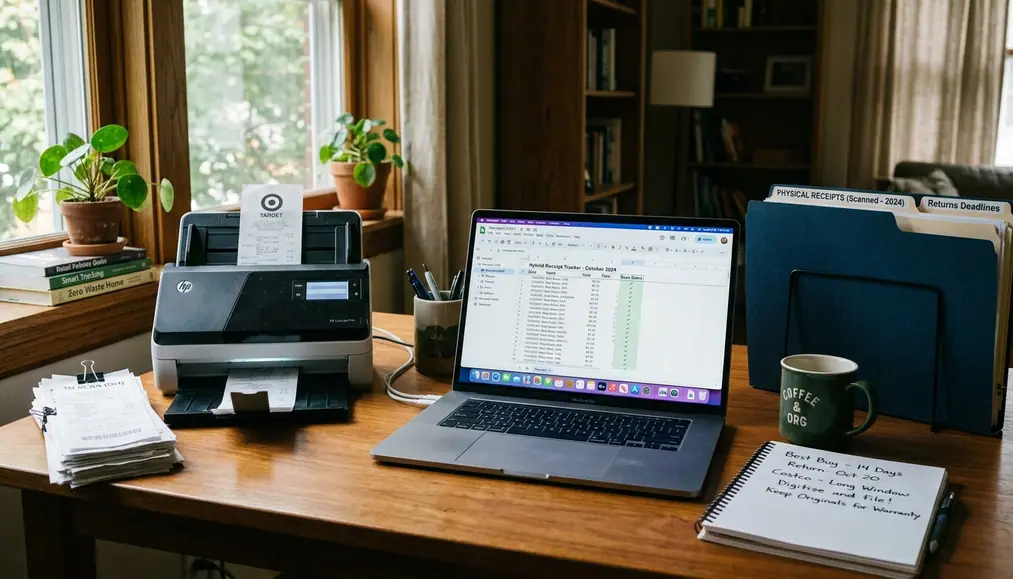
The best receipt system is not fully paper or fully digital. It is a short workflow that matches the receipt to the risk.
- Keep paper until the return window closes for anything that may go back to a store.
- Save digital for anything that may matter after the return window, including warranties, taxes, reimbursements, insurance, or household records.
- Shred or discard low-value receipts once they no longer support a return, warranty, claim, or reimbursement.
Take a $600 dishwasher bought in cash at a local appliance store in December. The paper slip goes in the return envelope until the item is installed and running. The same day, a scan of that slip lands in a “Dishwasher warranty” folder next to the model number, the serial number photographed off the door frame, and the manufacturer’s warranty email. When the return window closes, the envelope slip can move to long-term storage instead of the shred pile—because the warranty runs another two years, and the store took cash.
How to treat common receipt categories
- Groceries and routine consumables: keep only until the items are checked, unless the receipt supports a rebate, health account purchase, or household budget review.
- Clothing and seasonal purchases: keep paper until the try-on and return period are finished; save digital if the purchase was expensive or likely to be exchanged.
- Electronics and appliances: scan the receipt, save warranty emails, record the serial number, and keep the original paper receipt if warranty terms may require it.
- Gifts: keep the purchaser receipt for your records and give the recipient a gift receipt when available.
- Medical or insurance-related purchases: save digital copies with enough detail to show item, date, amount, and payment reference.
- Reimbursable work expenses: save a clean digital copy before submitting, because reimbursement systems do not always return the original image in an easy-to-use format.
- Tax-relevant records: keep supporting documentation in a durable digital folder and follow IRS recordkeeping guidance for what to retain.
Tax-supporting documentation generally needs to be kept for 3 to 7 years, depending on the filing situation and audit lookback period. That is a poor job for thermal paper alone. Scan the receipt, store it with the return year, and keep the paper only when the original has a separate legal or warranty purpose.
Folder structure that stays usable
Use a structure that can be understood on a tired weeknight: Receipts > Year > Retailer or Category. A folder named “2026 Medical Receipts” or “2026 Home Appliances” will beat a clever naming system that no one in the household remembers.
For filenames, use the details most likely to help later: date, retailer, item, and amount. A blender receipt might be named “2026-12-08-Target-Blender-89-99.pdf.” The goal is not perfection. The goal is finding the proof before the return deadline, warranty call, reimbursement form, or tax folder turns into a scavenger hunt.
Common Receipt Mistakes That Create Problems Later
Mistake 1: relying only on the retailer account
Store accounts are convenient until they are not. Access can depend on the right login, the original email address, app availability, purchase history limits, and whether the account is still active.
Retailer mobile apps frequently force session logouts after a month or two of inactivity. That is exactly the kind of small friction that becomes a large problem while standing at the return counter with a line behind you. Download the receipt or forward it to a receipt folder instead of trusting the account alone.
Mistake 2: taking a cropped photo
A receipt photo needs the whole story. The store name, date, item, total, payment reference, barcode, and return-policy language at the bottom should all be visible.
The bottom matters more than people think. Return policies, final-sale language, holiday extensions, and barcode details often sit in the last few inches of the receipt. If the photo cuts that off, the image may be useful for memory but weak as proof.
Mistake 3: tossing gift receipts too early
Gift receipts should survive the whole decision period. The recipient may need a different size, already own the item, or prefer store credit toward something else. Throwing away the gift receipt before the item is opened and accepted removes the easiest path to a clean return.
A simple rule works: if the item is wrapped, boxed, shipped, or waiting for a holiday, the gift receipt stays with it. If the recipient confirms they are keeping it, the purchaser can move the original receipt into the regular record system or discard it when it no longer serves a purpose.
Expert Tip: For gifts, keep two records: the gift receipt with the item and the full purchaser receipt in your own December or holiday folder.
A Receipt Plan You Can Copy Today
A holiday shopping example
Here is a full setup for a common December trip: one shopper buys a sweater from a clothing store, a blender from a big-box retailer, and a toy from a toy shop. The sweater has a printed receipt and a gift receipt. The blender receipt arrives by email. The toy shop hands over only a paper receipt.
- Make one envelope before anything goes missing. Write “December Returns” on the front. Put the sweater receipt, sweater gift receipt, and toy receipt inside as soon as the shopper gets home.
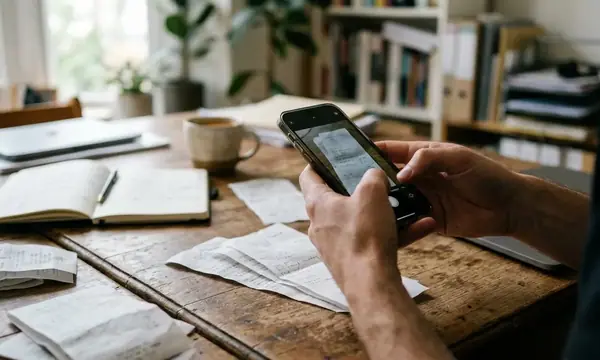
- Photograph every paper receipt the same day. For each photo, capture the store name, date, item, total, payment reference, barcode, and the return-policy language at the bottom.
- Save the emailed blender receipt. Download it as a PDF or forward it to a receipt folder. Do not leave the only copy buried in the inbox.
- Create one folder. Use Receipts > 2026 > December Returns. Save the sweater photo, toy receipt photo, and blender PDF there.
- Name the files plainly. Use “2026-12-10-ClothingStore-Sweater-Gift.pdf,” “2026-12-10-BigBox-Blender.pdf,” and “2026-12-10-ToyShop-Toy.pdf.”
- Add two calendar reminders. Set one for January 15 and one for January 31, because holiday return extensions often land on those dates. In each reminder, write: “Check December Returns envelope and folder before deadlines.”
- Hand off the gift receipt. Put the sweater gift receipt in the sweater box before wrapping. Keep the full purchaser receipt in the envelope.
- After the gifts are accepted, clean the system. If the sweater and toy are kept, discard their paper slips after the return period closes unless another claim is possible. Keep the blender receipt digitally with its warranty email and model information.
By the end of the same shopping day, the paper proof is in one envelope, the digital proof is searchable, the gift receipt is with the gift, and the January return deadlines are already on the calendar.