What Belongs in a Warranty Receipt File
I once opened a kitchen drawer looking for a refrigerator receipt and found three instruction booklets, a handful of faded slips, and a warranty card for an appliance that had already been replaced. The useful receipt was somewhere else. That familiar scramble explains why a warranty file needs to connect documents to products, rather than merely collect paperwork.
A warranty receipt file is a paper, digital, or hybrid record for each durable product. It should connect the proof of purchase with the product name, identifying numbers, manual, warranty terms, and service history.
Use a simple test: if the product stopped working today, could you identify the exact model and prove when and where it was purchased?
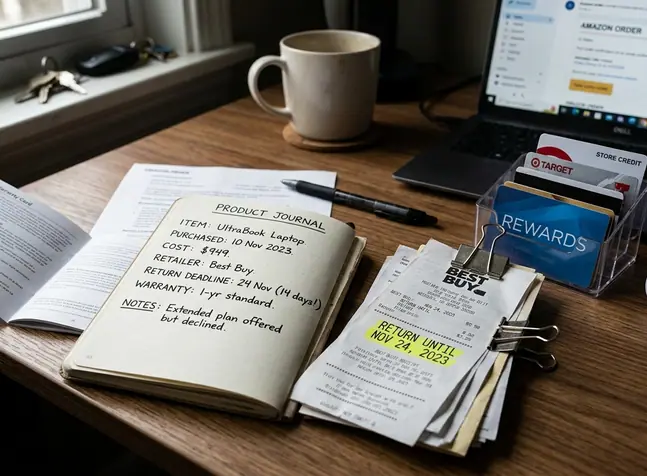
Keep the retailer return deadline separate from the manufacturer warranty. A return policy controls whether the seller will accept the product after purchase. A warranty sets the terms under which a manufacturer or another provider may repair, replace, or otherwise address a defect. Holiday return extensions can also change the retailer deadline, so preserve the policy that applied on the purchase date.
Track Both Clocks
Give the return deadline and warranty period their own fields. Combining them into one “coverage” date makes it easy to miss the shorter window.
Choose a Paper, Digital, or Hybrid Filing System
Paper works well when a claim requires an original receipt or signed document. It also survives app changes and forgotten passwords. Its weakness appears during retrieval: a perfectly preserved receipt still causes trouble when nobody remembers which folder contains it.
Digital folders offer fast search, simple duplication, and easy attachment to an online claim. They remain vulnerable when the only copy lives on one phone, laptop, or receipt-tracking app. A device failure or closed account can remove the whole archive at once.
A hybrid system gives most households the strongest balance. Keep important originals in a labeled physical folder, stored in a cool, dry interior location. Save searchable scans and product photographs in a backed-up digital folder. This adds a small amount of maintenance while protecting both convenience and original documents.
Choose an organizing method that matches the words people will actually search. Categories such as “Kitchen” or “Electronics” work for households that think by room or product type. Otherwise, arrange folders by purchase year and product name:
- Purchase year
- Product name
- Receipt, warranty, manual, and service records
Consistency matters more than an elaborate folder tree. A short structure that everyone understands will outlast a clever system that only its creator can navigate.
Build One Complete Record for Each Product
Start the record while the packaging and order details are still nearby. Waiting until a claim arises usually means reading a serial plate behind a heavy appliance or searching an old email account under pressure.
Product Record Cover Sheet
- Add the itemized receipt or order confirmation.
- Record the purchase date, seller, product name, and price.
- Note the payment reference when it will help locate the transaction.
- Identify the purchaser or gift recipient.
- Copy the model number, serial number, product code, color, and configuration exactly.
- Save the warranty document or PDF manual.
- Add registration confirmation and customer service contact details when applicable.
Model and serial numbers serve different purposes. The model identifies the product design or family. The serial number distinguishes the individual unit. A product code may identify a retail listing, size, finish, or package configuration. Record each label as written instead of assuming that one number can substitute for another.
Two Serial Photos
Take one wide photograph showing where the identification plate sits on the product. Then take a close photograph in which every character can be read. The wider image becomes surprisingly useful when a support representative asks where the number came from, or when someone needs to find the plate again after installation.
Include spaces, hyphens, and leading zeroes when transcribing identifiers. Similar characters such as the letter O and the number zero deserve a second look before the packaging is discarded.
Scan, Name, and File the Documents Consistently
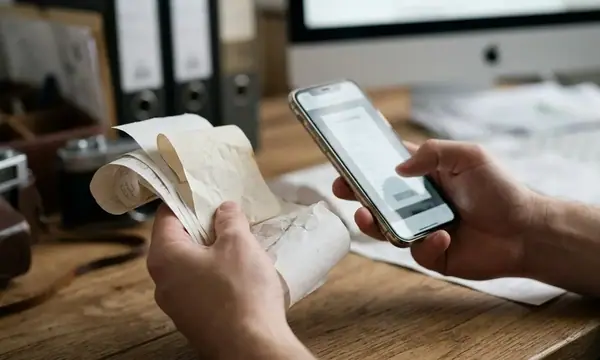
Flatten the receipt and place it on a surface that contrasts with the paper. Capture the entire page in even light, avoiding shadows from the phone and glare from glossy sections. Before filing the image, zoom in and confirm that the seller, date, item description, and total remain legible. Scan the reverse whenever it contains return terms or warranty language.
Thermal receipts deserve prompt attention because heat, light, and friction can reduce their contrast. Claims become harder when the paper has faded enough to hide the purchase date or item line. Digitize these receipts soon after checkout, especially for appliances, electronics, tools, and other products likely to need warranty support.
Scan Before Fading
A blurry scan preserves the shape of a receipt without preserving its evidence. Check the fine print at full magnification before putting the original away.
Use one naming pattern throughout the archive:
YYYY-MM-DD_Retailer_Product_DocumentType
A mixer receipt might follow the pattern 2026-03-18_Retailer_CountertopMixer_Receipt. The matching warranty, manual, and registration confirmation should keep the same date, retailer, and product wording. Consistent names allow ordinary folder search to function as a dependable retrieval tool.
Record the Dates That Control Returns and Warranty Claims
Which date should go on the calendar? Copy every date that controls a separate right or obligation.
- Retailer return deadline: the final date for returning or exchanging the purchase under the applicable retailer policy.
- Manufacturer warranty period: the stated coverage term and the event that starts it.
- Protection-plan term: the start, end, exclusions, and provider contact details.
- Claim procedure: any registration, authorization, shipping, or notice requirement stated in the terms.
Coverage may begin on the purchase date, delivery date, installation date, or another event named in the warranty. Copy that controlling language into the product record. Guessing from the receipt date can produce the wrong deadline.
Add a calendar reminder several days before a short return window closes. Use that time to test each function, inspect included parts, confirm fit, and locate the packaging. Products purchased under a holiday extension need the specific seasonal policy saved with the receipt; the seller’s standard policy may show a different deadline later.
For general background on written and implied coverage, see the FTC consumer guidance on warranties.
Protect the File and Keep It Current
A digital warranty archive should exist in a backed-up location. Keeping the sole copy inside one receipt-tracking app creates an unnecessary point of failure. Export important files when the app allows it, and store them in a folder format that can be opened without specialized software.
Treat privacy edits carefully. Crop unrelated payment details when the remaining image still proves the transaction. Preserve the seller, transaction date, item description, total, and any reference needed to locate the purchase. Restrict access to folders containing names, delivery addresses, account references, or support correspondence.
The record should follow the product through its useful life. Add repair invoices, replacement-part receipts, shipping confirmations, support case numbers, technician notes, and written resolutions to the same folder. If a replacement unit receives a new serial number, record it beside the original rather than overwriting the history.
A Short Maintenance Pass
Schedule a recurring review. Remove records for products that have been discarded, mark expired coverage clearly, and update active repair logs. Keep documents connected to unresolved claims or pending reimbursements even after the stated warranty ends, since they may explain a replacement, refund, or account credit.
Turn the Product Record Into a Claim-Ready Packet
A well-kept folder becomes valuable when it can be converted into a clean claim packet. Gather the receipt, model and serial numbers, warranty terms, failure date, concise problem description, photographs, and earlier support correspondence. Put the documents in the order a reviewer is likely to need them.
Describe the problem in concrete terms. “Stops after several minutes and displays an error code” gives support staff more to work with than “doesn’t work.” Include photographs that show the product, the identification plate, visible damage, and any displayed message. Preserve the original files even if a claim portal compresses the uploaded copies.
A complete record cannot establish coverage when the terms exclude the problem. It does, however, remove avoidable uncertainty about the purchase, product identity, and steps already taken.
Keep Submission Proof
Send copies unless the claim instructions specifically request an original. Save the submitted files, confirmation page, case number, shipping record, and submission date in the product folder.
Create the hybrid file on the day you buy a durable product: preserve the important original, scan the full receipt, photograph the serial plate, and set the return reminder before putting the item into regular use.